Unboxing & SetupPAX A920 MAXPAX A920Verifone T650Elo Z30PAX E700Elo Paypoint & PAXS300Elo Paypoint & Verifone T650cIngenico Moby5500Cash Drawer Comms BasePrinterScannerSocketScan Mobile S720Login for the First TimeStaff Management Add a UserAdd GroupsSync Changes to the AppInventory Management TaxesItem Library Import an Item LibraryItem ScreensAdd Modifiers Add a Modifier SetDiscountsItem Alert MessagesStore SetupStore OperationsCustomize ReceiptsMarketplaceOrder AheadInvoiceVirtual Terminal AnalyticsSales Summary SalesTransactionsBatch - End of Day Complete a TransactionCheckoutOverviewCountertopHandheldMobileOverviewPortalAuto-Batch ClosingBatchesBrandingCalendarDiscountsEBT ReportingEdit LocationsInvoiceItem Alert MessagesItem Mix Merchant Settlement Report Prior Period ComparisonTendersTransactionsVirtual Terminal AppointmentsAppointments Enablement and ConfigurationManaging ServicesManaging Appointments (Portal)Navigate To Appointment Scheduler (Portal)Observe MetricsSchedule an Appointment (Portal)Appointment Scheduler (Countertop)Appointment Scheduler (Handheld) Managing Appointments (POS)Schedule an Appointment (Customer)DeliveryOverviewFAQsConfigure DeliveryManage Delivery OrdersPause and Resume DeliveryDiscountsAdd a DiscountEdit DiscountsSet Discounts for a LocationDual PricingOverviewFAQCheckout Using Dual Pricing Item LibraryActivate or Deactivate Taxes Add a CategoryAdd an ItemAdd an Item Alert MessageAdd ModifiersAdd a New Screen LayoutAdd a Subcategory or GroupAdd TaxesAssign ModifiersItem BarcodesDelete Categories, Subcategories, or GroupsDelete an ItemDelete Item Alert MessageEdit a Category, Subcategory, or GroupEdit Item Alert MessageEdit ModifiersEdit TaxesImport an Item LibraryMove an Item or Multiple ItemsPackaging OverviewSort Item Screens and ItemsVendor Management Manage OrdersAdd Items to an Order Apply Tax Exempt to an Order Apply a Discount Cancel a SaleCheckout a Held Order Current SalesHold a Sale Issue a Full Refund from your Register Open a Held Order Remove a DiscountRemove Items From an Order View and Edit Order InformationOrder AheadPOS App Home ScreenManager OverrideOpen OrdersPerform In-App Tip Adjustments Search Audit InformationSearch TendersTip Screen and Signature Screen Reset PasswordSettingsAdd a Modifier SetAdd PrintersAssign Modifier Sets Delete a Modifier Set Delete PrintersEdit Items for a Location Edit Modifier SetsEnable or Disable Tender TypesSync Changes to the AppTip Screen SuggestionStaff Management Activate or Deactivate UsersAdd GroupsAdd a UserCreate or Change a User PIN Delete GroupsEdit Groups and Group PermissionsEdit a UserEnable PIN Login TimeclockAdd a RoleAdd a Shift Clock InClock OutDelete a Shift Edit a Role Edit a Shift End a Break Select a Role Start a Break View Shifts Print or Email Shift SummaryTime Clock DashboardTimeclock SettingsTimeclock Shifts TransactionsCheckout Using Cash Checkout Using a Credit Card Checkout using EBTCheckout Using a Debit Card Export Transaction DataProcessing an EBT RefundRemove a Tender From a Sale Search Batches Search for a Transaction Use the Signature ScreenUse the Tip ScreenView Batch Audit InformationView Transaction Audit Information View Transaction DetailsOverviewCompetitive Benchmark OverviewQuick Start Guide FAQ Customer DemographicsOverviewFAQQuick Start Guide Understanding DemographicsCustomer Module(CRM) Overview - PortalAdd a Customer - PortalDirectory Page - Portal Customer Details Page - Portal Setting User Permissions - PortalOverview - CountertopDirectory Page - CountertopCustomer Details Page - CountertopEmail MarketingOverviewFAQQuick Start GuideAvoid Legal Pitfalls in Email MarketingEmail Templates Best PracticesCreating Email Marketing Templates for AutomationsDo my emails with or without coupons have more effect? Email Marketing Brevity Effective Messaging Through Email MarketingGuide to Customer Engagement Targeting Through Email MarketingLoyaltyOverviewFAQQuick Start Guide MarketplaceGift CardGift Card OverviewGift Card FAQsBoost Holiday Sales Gift Card - Point of SaleGift Self Service FAQsEnsure Gift Program Success Promote Gift CardsGift Card OrderingGift Quick Start GuideGift User GuideMarketing you Gift CardsGoogle AdsOverviewFAQQuick Start GuideA/B Testing with Google AdsCreating a Call to ActionCreating Google Ads ContentLanguage and ToneUsing Keywords with Google AdsUsing Market SegmentationGoogle Business ProfileOverviewFAQQuick Start GuideAdding Photos Keeping Customers Up to DateManaging ReviewsMaximizing Your Google Business ProfilePayment Analytics OverviewQuick Start Guide Comparing PerformanceNew vs Returning CustomersHosting Special Event to Boost BusinessTrack Direct Mail Campaign ResultsUsing DaybookReputation ManagementOverviewFAQQuick Start Guide How Review Stars Affect Your SalesHow to Win Back Customers Who Leave Negative ReviewsManaging Your Social Reputation EffectivelyPostal Code Marketing Respond to Negative ReviewsResponding to Online Reviews for Business Reputation What impact do my social media ads have?

Customer Demographics QuickStart Guide

In this guide, we will help you understand what is available with Customer Demographics and how you can use this information to make data-driven decisions for your business.


Customer Wallet
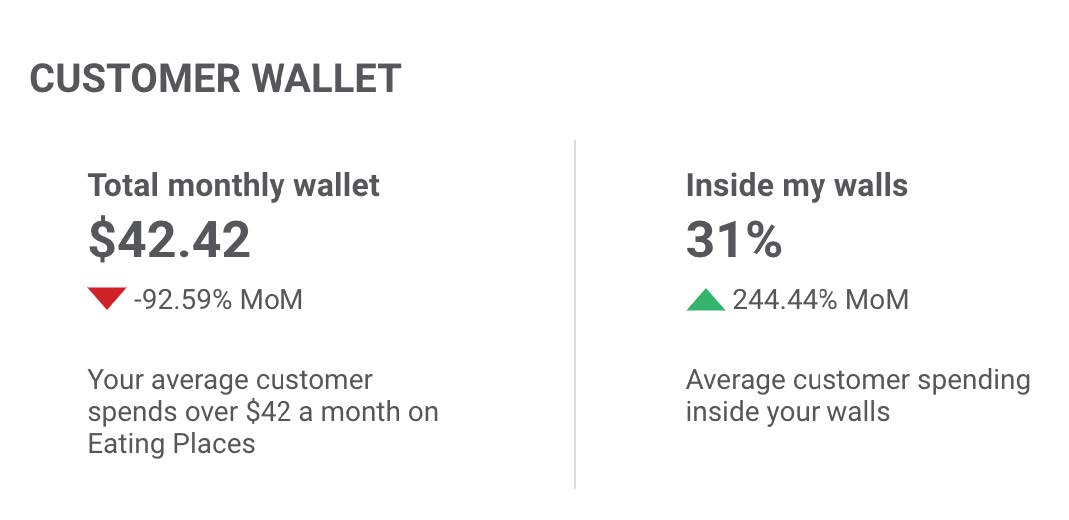
How much does your customer spend on average in your industry? How much of that are they spending at your business? Now you know.


Customer Wallet tells you how much your average customer spends in your industry AND what percent of that total is spent inside your walls.


Average Ticket
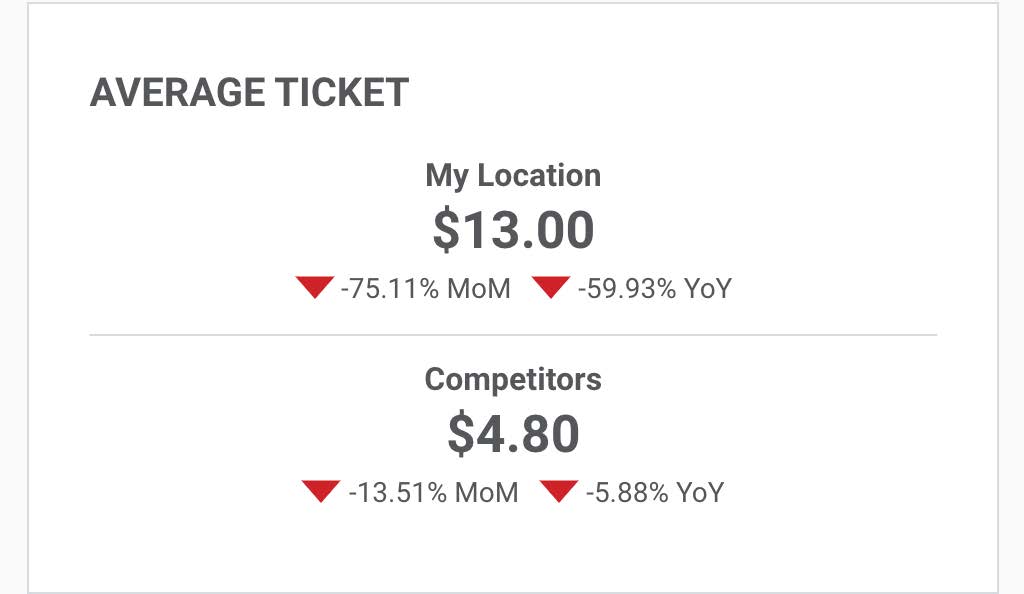


View your average ticket amount and compare it to that of your competitors.


View your positive or negative trends with MoM (this month compared to last month) and YoY (this year compared to last year) indicators.


Reach
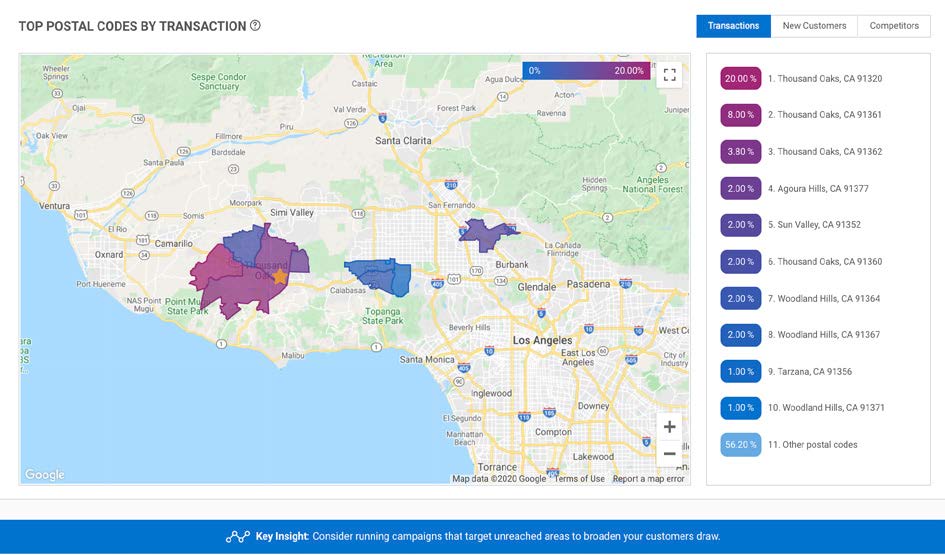


Knowing where your customers come from is an important part of advertising and business planning.


The postal code dashboard shows you where your customers are from based on the postal code connected to their method of payment.


Customer Demographics
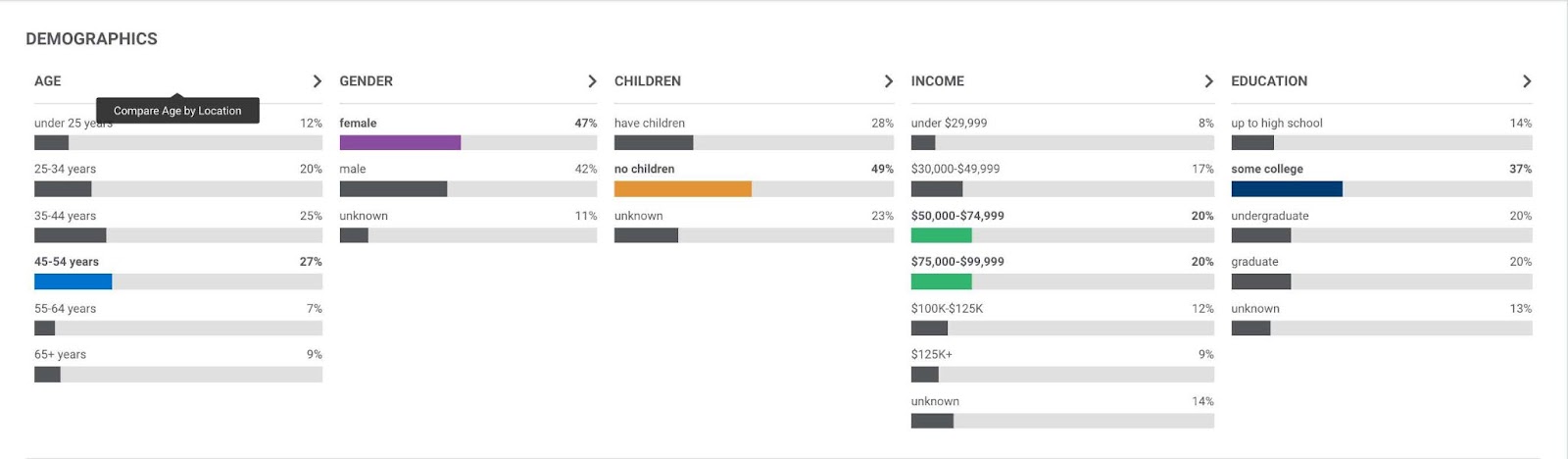
Using Customer Demographics helps you to understand your target customers.


Based on transaction data and spending habits, you can see what kinds of customers are frequenting your business.


Learn even more about who’s walking through your doors by comparing customer data. Hover and click on each category name to compare customer demographics by age, gender, children, income, and education.


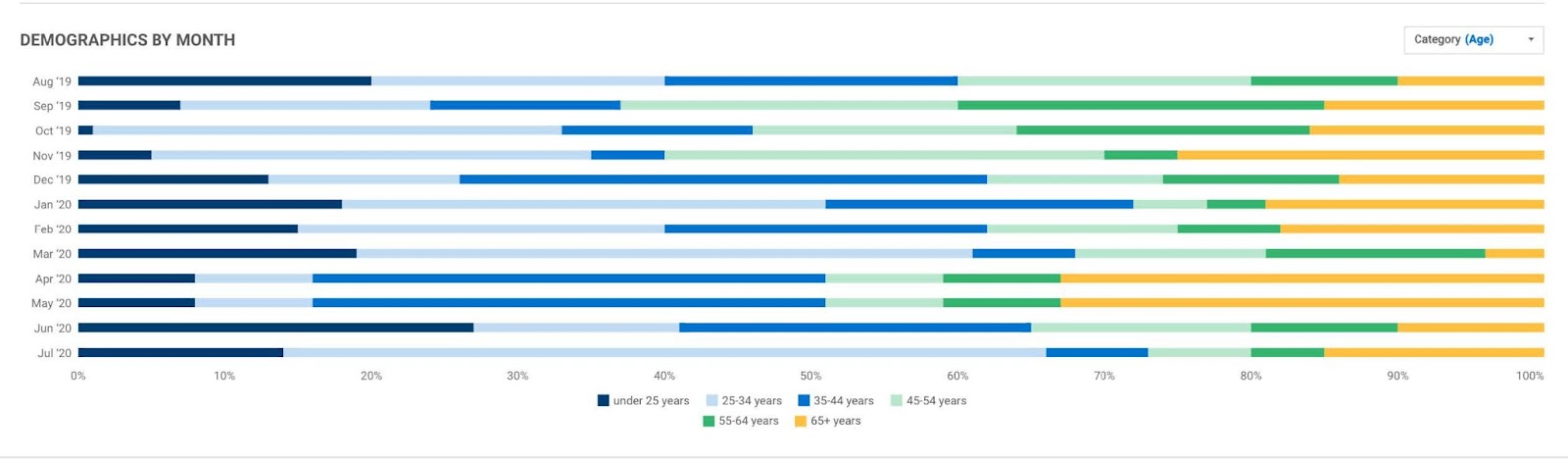
Demographics by Month

Demographics by Month gives you a side-by-side comparison of your customer base over the last 12 months, so you can see exactly how your customer base is evolving over time. This provides a valuable tool to help determine and measure marketing efforts.


Click the drop-down menu to select and view each demographic type.


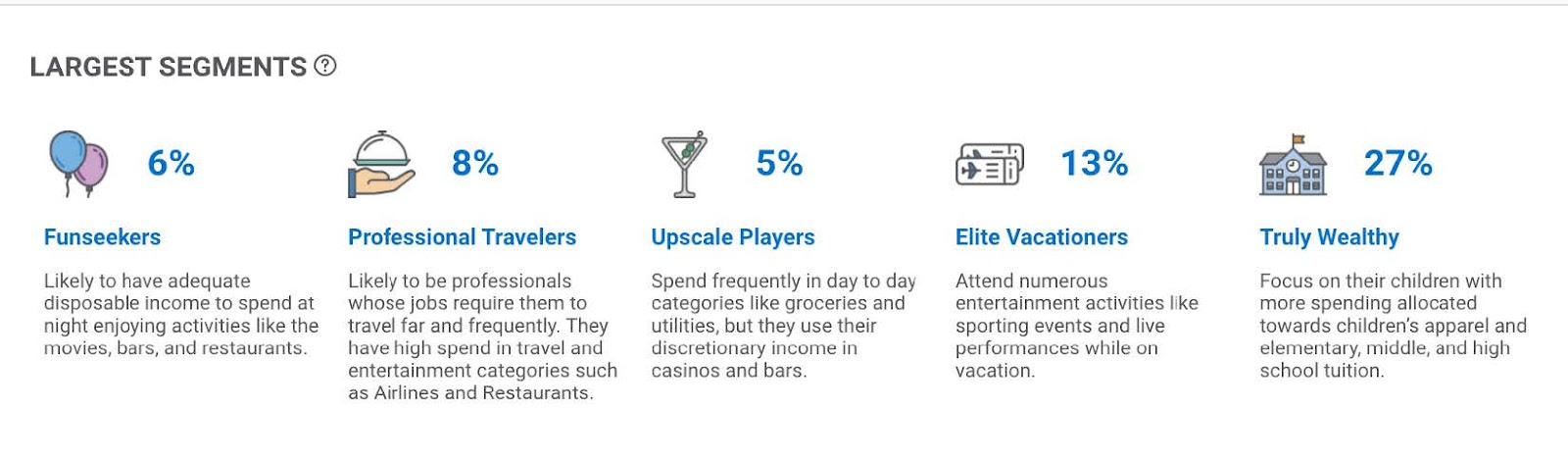
Largest Segments

Get to know your customers even further.


Largest Segments uses transaction data to organize your customers into similar groups. These groups feature customer interests and spending habits, giving you more insight into the types of customers that are most frequently walking through your doors.
 

Location Comparison

View all your selected locations and compare demographic data in the Location Comparison table.


Sort each column by selecting the double arrow icon next to each category title.


Click the drop-down menu to select and view each demographic type.
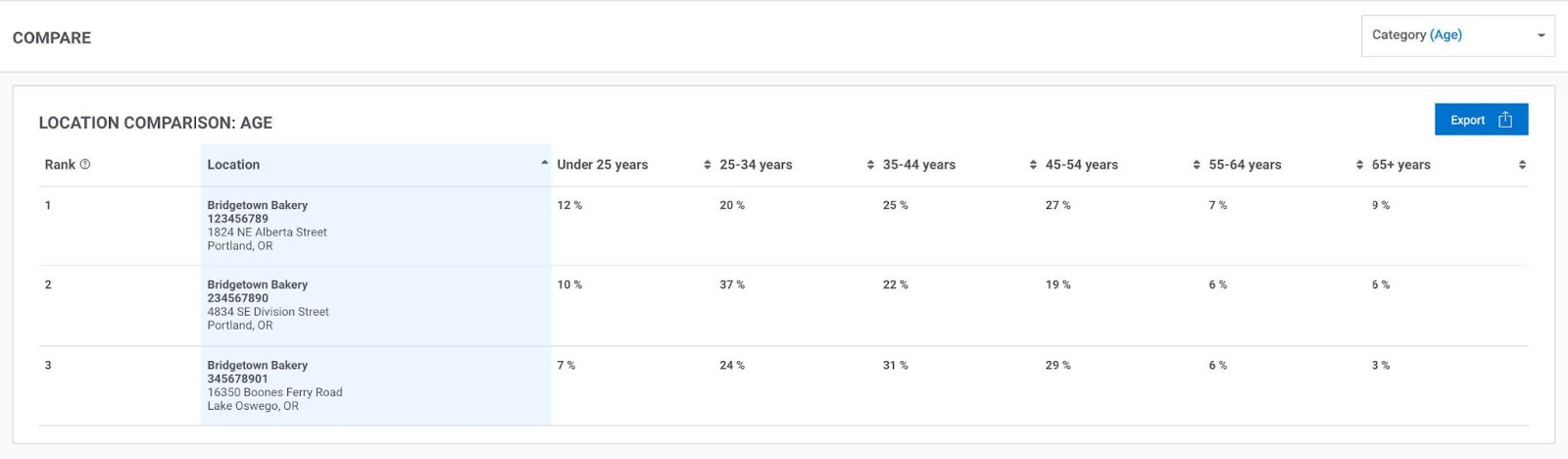


Comparing customer demographics by location will help you to know where to target your marketing efforts.

Can't find the answers you're looking for? We're here to help.